Keyboard
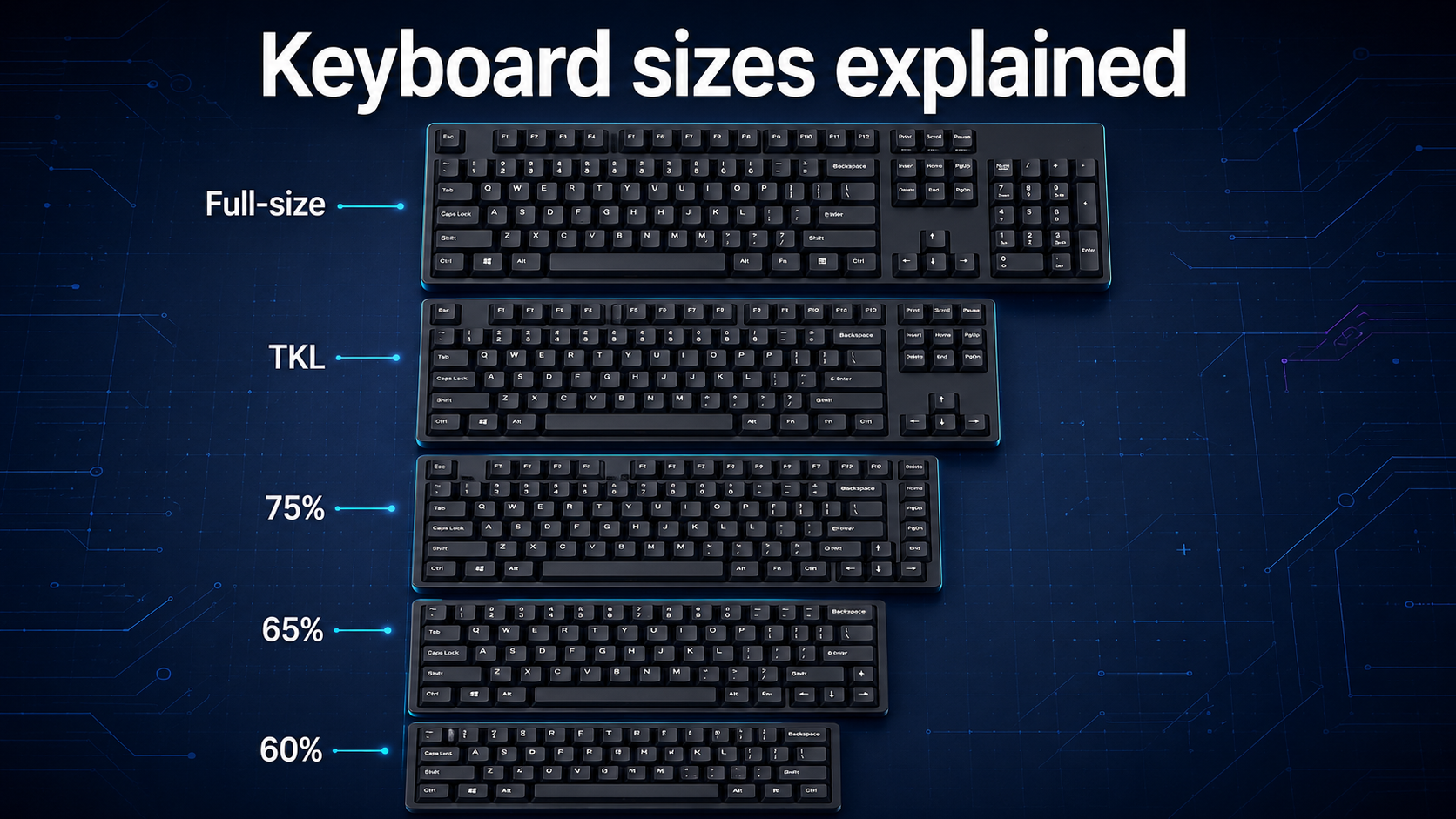
Keyboard sizes explained: Full-size, TKL, 75%, 65% and 60%
Compare full-size, TKL, 75%, 65% and 60% Keyboard Layouts, see which keys each size keeps and find the right option for Work, Gaming or Travel.
Keyboard sizes explained: Full-size, TKL, 75%, 65% and 60%
Keyboard shopping becomes confusing as soon as you see labels such as TKL, 75%, 65% and 60%. These names describe the keyboard's physical layout, but they do not always tell you exactly how many keys it has or which features are missing.
A smaller keyboard can free valuable desk space, make travel easier and give your mouse more room. However, saving space usually means removing dedicated keys or moving their functions to shortcuts. The smallest option is not automatically the best one.
This guide explains the most common keyboard sizes, the keys each layout keeps, the compromises it makes and the type of user it suits. By the end, you should know whether you need a full-size, tenkeyless, 75%, 65% or 60% keyboard.
If you are comparing switches, connectivity and other features as well, start with our complete Best Keyboard Buying Guide 2026. You can also read our mechanical vs membrane keyboard comparison before choosing a construction type.
Quick answer
- Choose full-size if you regularly enter numbers, use spreadsheets or want every common key available directly.
- Choose TKL if you want the function row, arrow keys and navigation cluster but do not need a number pad.
- Choose 75% if you want nearly all TKL functions in a narrower, laptop-like layout.
- Choose 65% if you want a compact keyboard with dedicated arrow keys but can use shortcuts for the function row.
- Choose 60% if maximum desk space and portability matter more than dedicated arrows, function keys and navigation keys.
For most people moving away from a full-size keyboard, TKL or 75% is the easiest adjustment. A 65% keyboard offers an excellent balance for gaming and portable work. A 60% keyboard is best when you understand its function layers and genuinely prefer minimal size.
What do keyboard size percentages mean?
The percentage describes the approximate size or key coverage of a keyboard compared with a traditional full-size model. It is a useful category name, not a strict measurement standard.
Two keyboards sold as 75% can have different key counts, spacing and navigation keys. Some 65% boards include Page Up and Page Down, while others replace one of them with Delete or an extra programmable key. Knobs, macro keys and unusual space bars can create further variations.
This is why you should inspect the actual product image and layout diagram instead of buying from the percentage alone. Keychron's keyboard size and layout guide also presents these form factors as families with different balances between keys and desk space.
The common names in this guide refer to these general arrangements:
- Full-size or 100%: Alphanumeric section, function row, navigation cluster, arrow keys and number pad
- TKL or tenkeyless: Full-size layout without the number pad
- 75%: TKL functions compressed into a tighter block
- 65%: Main typing area with dedicated arrows and a few navigation keys
- 60%: Main typing area without dedicated function, navigation or arrow sections
What is a full-size keyboard?
A full-size keyboard provides the most complete familiar layout. It normally includes the letter and number area, a top function row, dedicated arrow keys, a navigation cluster and a separate numeric keypad. Common ANSI models often have around 104 keys, while ISO and regional layouts can use a different count.
The number pad is the main reason to choose full-size. It is valuable for spreadsheets, finance, accounting, data entry and any task involving frequent numerical input. Dedicated Home, End, Page Up, Page Down, Insert and Delete keys also reduce the need for shortcuts.
Advantages of a full-size keyboard
- Includes nearly every standard key
- Dedicated number pad for fast numerical entry
- Full function row and navigation cluster
- Familiar layout with a small learning curve
- Suitable for applications with many shortcuts
- Available in office, gaming and ergonomic designs
Disadvantages of a full-size keyboard
- Uses the most desk space
- Leaves less room for wide mouse movement
- Can position the mouse farther from your shoulder
- Heavier and less convenient to carry
- Many users rarely touch the number pad
A full-size keyboard is best for accountants, analysts, administrators, spreadsheet-heavy professionals and users who want every key ready without layers. It is less attractive for a narrow desk or a low-sensitivity gaming setup that needs a large mouse area.
What is a TKL keyboard?
TKL means tenkeyless. The name refers to removing the numeric keypad, although a number pad contains more than ten physical keys. The rest of the traditional layout generally remains, including the function row, arrow keys and navigation cluster.
Common TKL boards have around 87 or 88 keys depending on the regional layout, but additional controls can change the count. The familiar separation between key groups makes a TKL easy to learn.
Advantages of a TKL keyboard
- Retains dedicated function, arrow and navigation keys
- Creates more mouse room than full-size
- Easy transition from a standard keyboard
- Widely available in gaming and mechanical ranges
- Usually offers standard key spacing
- Easier to carry than a full-size board
Disadvantages of a TKL keyboard
- No dedicated number pad
- Larger than 75%, 65% and 60% keyboards
- Still includes navigation keys some users rarely need
- May require a separate number pad for numerical work
TKL is one of the safest choices for gamers, writers and general office users who do not enter large volumes of numbers. It reduces width without forcing most people to learn a new way of using arrow or function keys.
What is a 75% keyboard?
A 75% keyboard keeps many of the keys found on a TKL but compresses them into a tighter layout. It normally retains the function row and dedicated arrow keys, along with a smaller selection of navigation keys.
The main sections sit closer together, so there is less empty space between the typing area, arrows and navigation column. This makes the keyboard narrower while preserving most frequently used functions. Many 75% layouts have roughly 80 to 84 keys, although the exact number varies.
Razer describes its current 75% keyboard layout as a compact version of TKL that retains the function row, arrows and selected navigation keys. This is a useful general description, but individual products should still be checked.
Advantages of a 75% keyboard
- Dedicated function row and arrow keys
- Most TKL functions in a smaller footprint
- Good balance between productivity and desk space
- Familiar to users of compact laptop keyboards
- Suitable for gaming, writing and programming
- Often includes a few dedicated navigation keys
Disadvantages of a 75% keyboard
- Compressed spacing can take time to learn
- Navigation key selection varies by model
- Non-standard key sizes may complicate keycap replacement
- No number pad
- Keys can feel visually crowded
A 75% keyboard is a strong all-round option for users who want a compact design but regularly use F-keys and arrows. It is especially practical for work setups that need portability without relying heavily on function-layer shortcuts.
What is a 65% keyboard?
A 65% keyboard removes the dedicated function row and number pad but keeps physical arrow keys. It also normally includes a small number of navigation keys in a column on the right.
Common models have around 66 to 68 keys, but layouts vary. The function keys, media controls and missing navigation commands remain available through an Fn layer. A 65% keyboard is only slightly wider than a 60% model but can be much easier to use because the arrows are immediately accessible.
Advantages of a 65% keyboard
- Compact footprint with dedicated arrow keys
- More practical for editing than many 60% layouts
- Creates generous mouse space
- Easy to carry between workspaces
- Good balance for gaming and everyday typing
- Available in many wired, wireless and tri-mode models
Disadvantages of a 65% keyboard
- No dedicated function row
- Limited navigation keys
- No number pad
- Frequent shortcut users may need to learn layers
- Some layouts use unusual right Shift and modifier sizes
A 65% keyboard suits gamers, students and users who want a small keyboard without giving up arrows. It is often the best compromise for someone attracted to 60% size but concerned about daily navigation.
What is a 60% keyboard?
A 60% keyboard concentrates on the main alphanumeric area. It normally removes the number pad, function row, arrow cluster and dedicated navigation keys. Many common versions have around 61 keys, with the missing commands placed on one or more function layers.
The result is a narrow, minimal keyboard that provides maximum room for mouse movement. This is popular in competitive gaming and portable setups, but it requires the greatest adjustment for everyday productivity.
Wooting's guide to 60% and 65% keyboards highlights the central difference: a traditional 60% layout places arrows and navigation functions on layers, while 65% adds dedicated arrows.
Advantages of a 60% keyboard
- Maximum desk and mouse space
- Light and convenient for travel
- Clean, minimal appearance
- Hands move less distance across the keyboard
- Popular range of enthusiast cases and accessories
- Useful for gaming setups with wide mouse movement
Disadvantages of a 60% keyboard
- No dedicated arrow keys on most traditional layouts
- No physical function row or navigation cluster
- No number pad
- Requires frequent Fn combinations
- Can slow spreadsheet, coding or editing workflows
- Layer markings and shortcuts differ by model
A 60% keyboard is best for minimalists, frequent travellers and gamers who value mouse space more than dedicated commands. It can also be efficient for experienced users who customise their layers, but it is not the safest first compact keyboard for everyone.
Keyboard size comparison
| Feature | Full-size | TKL | 75% | 65% | 60% |
|---|---|---|---|---|---|
| Approximate key count | 104–105 | 87–88 | 80–84 | 66–68 | 61–62 |
| Number pad | Yes | No | No | No | No |
| Function row | Yes | Yes | Yes | Fn layer | Fn layer |
| Dedicated arrows | Yes | Yes | Yes | Usually | Usually no |
| Navigation keys | Full cluster | Full cluster | Selected keys | Few keys | Fn layer |
| Desk space | Highest use | Moderate | Compact | Very compact | Smallest |
| Learning curve | Lowest | Low | Low to moderate | Moderate | Highest |
| Best for | Numbers and productivity | Gaming and general use | Compact productivity | Gaming and portability | Mouse space and minimalism |
The key counts are typical examples, not guaranteed specifications. Regional standards, rotary knobs, extra controls and manufacturer choices can change them.
Best keyboard size for work and study
The best work keyboard depends on the applications you use. If your day involves Excel, financial systems or repeated numerical entry, full-size is the most practical option. A separate number pad can make a compact keyboard more flexible, but it adds another device and may cost more overall.
For writing, email, presentations and general administration, TKL or 75% usually provides everything required. You keep arrows, the function row and enough navigation keys without using as much desk space as full-size.
A 65% keyboard works well for students and flexible workers who move between home, office and class. It keeps arrows for document navigation and fits easily beside a laptop. A 60% keyboard can work for study, but frequent shortcut combinations may be inconvenient when editing long documents.
Connection type also matters for mobile work. Our wired vs wireless keyboard comparison explains when Bluetooth, a 2.4 GHz receiver or USB makes more sense.
Best keyboard size for gaming
Smaller keyboards are popular for gaming because they create more space for the mouse. This is especially useful for players who use low sensitivity and make wide movements in first-person shooters.
A TKL keyboard is the safest gaming recommendation. It gives the mouse extra room while retaining F-keys, arrows and navigation controls. It also suits games with many commands better than a very compact layout.
A 75% keyboard provides similar functions in a tighter package. A 65% or 60% keyboard maximises mouse space and can work extremely well for FPS and action games, but strategy games, simulators and MMOs may benefit from more dedicated keys.
Do not choose a keyboard size based only on esports marketing. Consider the games you actually play and list the F-keys, number keys, arrows, macros and navigation commands you use. Razer's current keyboard range, for example, offers full-size, TKL, 75%, 65% and 60% options because different gaming workflows need different layouts.
Switch feel is a separate choice from size. Read our red vs blue vs brown keyboard switches guide to compare common linear, clicky and tactile options.
Best keyboard size for programming
Programmers often use arrows, Home, End, Page Up, Page Down, Delete and function keys. TKL keeps all of these in familiar positions, making it a dependable choice for coding.
A 75% keyboard retains most of the same functions while reducing width. The compressed layout can be efficient after a short adjustment, but confirm the placement of Delete, Home and End before buying.
A 65% keyboard can work well when its navigation layer is comfortable and remappable. A 60% keyboard may also become efficient for an experienced user who keeps common commands close to the home row, but it introduces a larger learning curve.
Developers who frequently enter numbers, work with data or use complex application shortcuts may still prefer full-size. There is no universal coding layout; the best option is the smallest board that keeps your most-used commands convenient.
Function layers and missing keys
Compact keyboards do not necessarily remove a command completely. They move it to a secondary layer. You might hold Fn and press a number for F1–F12, or combine Fn with another key for arrows, media controls and navigation.
Layers can be efficient when their positions are easy to remember. Keeping arrows around the right-hand home-row area, for example, may reduce hand movement. They become frustrating when important functions are poorly placed, unmarked or impossible to customise.
Before choosing a 65% or 60% keyboard, download its manual and check:
- Where F1–F12 are located
- How arrows are accessed
- Whether Home, End, Delete and Page keys are available
- How media and lighting controls work
- Whether the Fn key can be remapped
- Whether settings are stored in onboard memory
- Whether remapping software supports your operating system
A programmable layer can make a compact keyboard feel personalised. A fixed layer that conflicts with your habits can make the same layout unnecessarily difficult.
Layout and keycap compatibility
Keyboard size is not the same as language or physical key standard. ANSI and ISO layouts use different Enter keys, Shift keys and surrounding arrangements. Regional versions also change printed characters and may add or reposition keys.
If you plan to replace keycaps, check the exact size of the space bar, right Shift, bottom-row modifiers and navigation keys. Some compact keyboards use non-standard key sizes to fit everything into a smaller case.
Keychron's keycap compatibility guide notes that full-size, TKL, 75%, 65% and 60% layouts may use different key sizes, particularly in the bottom row. A keycap set supporting the general percentage may still lack one unusual key your board needs.
Also confirm operating-system legends and firmware support. A keyboard may work on Windows and macOS but place Command, Option, Alt and Windows labels differently. Physical compatibility and software compatibility should both be checked.
How to choose the right keyboard size
Step 1: Track the keys you use
For a normal week, notice how often you use the number pad, F-row, arrows and navigation cluster. Keys you use several times every hour should probably remain dedicated.
Step 2: Measure your desk
Measure the space available for both keyboard and mouse. A smaller keyboard can improve comfort when a full-size board pushes your mouse too far to the side.
Step 3: Consider your main tasks
Numbers favour full-size. General work and mixed gaming favour TKL or 75%. Portability and mouse space favour 65% or 60%.
Step 4: Check the exact layout
Do not rely on the percentage. Inspect every key, the gaps between clusters and the printed secondary functions.
Step 5: Review the Fn layer
Make sure missing keys remain accessible in logical positions. If possible, choose a model with remapping and onboard memory.
Step 6: Think about future needs
A small keyboard may look appealing today, but your work or game preferences may change. When uncertain, TKL or 75% gives you more flexibility with a modest size reduction.
Final verdict
Full-size is the best keyboard layout for frequent number entry and users who want every key immediately available. TKL removes only the number pad, making it the easiest space-saving choice for general use and gaming.
A 75% keyboard keeps most TKL functions while compressing the layout, making it an excellent compact productivity option. A 65% keyboard removes the function row but retains arrows, which creates a strong balance between portability and usability.
A 60% keyboard offers the most mouse room and the cleanest footprint, but it asks you to rely on function layers for arrows, navigation and F-keys. Choose it because those shortcuts suit you, not simply because it is the smallest.
For most first-time compact-keyboard buyers, TKL or 75% is the safest starting point. Choose 65% when portability matters, and move to 60% only when you are comfortable with its missing dedicated keys.
Use our complete keyboard buying guide to compare your chosen size with switch types, connectivity, ergonomics and budget before buying.
Frequently asked questions
What keyboard size is best for most people?
TKL or 75% is best for many users because both layouts retain dedicated arrows and function keys while using less desk space than full-size. Choose full-size if you regularly need a number pad.
What is the difference between TKL and 75%?
Both usually include a function row and arrow keys. TKL keeps a more traditional separation between the typing, navigation and arrow sections, while 75% compresses the keys into a tighter layout and may include fewer navigation keys.
Is a 65% keyboard better than a 60% keyboard?
A 65% keyboard is more convenient for most everyday users because it usually has dedicated arrow keys and a few navigation keys. A 60% keyboard is slightly smaller but moves those commands to an Fn layer.
Are 60% keyboards good for typing?
Yes, a 60% keyboard can be excellent for normal text entry because it retains the main alphanumeric area. It may be less convenient for editing when you frequently need arrows, Delete, Home, End or function keys.
What keyboard size is best for gaming?
TKL is a safe all-round gaming choice because it creates more mouse space without removing the function row or arrows. A 65% or 60% keyboard can be better for FPS gaming when maximum mouse movement matters.
Do I need a full-size keyboard for Excel?
You do not need one, but a dedicated number pad can make repeated numerical entry faster. If you mainly use formulas and navigation rather than entering large amounts of data, TKL or 75% may still work well.
How many keys does a 75% keyboard have?
Many 75% keyboards have roughly 80 to 84 keys, but there is no single required count. The number varies with the regional layout, navigation keys, knobs and manufacturer design.
Can I add a number pad to a compact keyboard?
Yes. A separate USB or wireless number pad can be placed on either side of the keyboard and stored when not needed. This can provide the flexibility of a compact keyboard without permanently giving up numerical entry.